Data science workflow
AI data science notebook for model evaluation, dataset analysis, and reproducible reporting
See how notebook-native AI can support exploratory analysis, repeated evaluation, and reviewable model comparison without moving the important work out of the notebook.
Quick answer
An AI data science notebook is most useful when your team still wants the notebook to be the final artifact. The goal is not to replace notebook work with chat. The goal is to make dataset analysis, experiment iteration, model comparison, and reporting faster while keeping the actual analytical record intact.
That is why the value is not simply that AI writes code. The real value is that AI can accelerate notebook-native analysis while preserving inspectability. If the assistant is helpful but the important steps move into prompts, temporary runtime state, or disconnected snippets, the workflow becomes harder to review.
For technical teams, the best AI notebook experience is one where files, runnable code, metrics, plots, and conclusions remain visible in the same place. That is what makes the notebook a useful handoff object rather than just a scratchpad.
What a data science notebook actually needs to support
JupyterLab describes a computational notebook as a shareable document that combines code, plain-language descriptions, data, rich visualizations, and interactive controls. The notebook documentation similarly describes notebooks as documents that combine live runnable code with markdown, equations, images, interactive visualizations, and other rich output.
Data science work usually adds more pressure on top of that baseline. Teams are not only writing code and text. They are handling uploaded files, intermediate transformations, baselines, metrics, plots, feature inspection, and repeated experiments across changing datasets or parameters.
That means the workflow to preserve is broader than a notebook file alone. Before AI enters the loop, the notebook already needs to hold together code, outputs, assumptions, and enough context that someone else can understand how the analysis was produced.
Where data science workflows usually break
This is workflow analysis rather than a formal standard, but the breakpoints are familiar. Exploratory work often happens outside the notebook in chat or ad hoc scripts. Metrics and plots stop matching the current code because cells are edited without being rerun. Model comparison gets fragmented across multiple tools. Dataset assumptions become implicit. And repeated runs become painful as soon as parameters, date ranges, or file selections change.
| Weak workflow | Stronger notebook workflow |
|---|---|
| Exploratory steps happen mostly in chat or one-off code outside the notebook. | Exploration is captured in runnable cells and visible outputs inside the notebook. |
| Metrics and plots are copied into conclusions without being regenerated. | Evaluation artifacts stay tied to the code and can be rerun when assumptions change. |
| Model comparisons are split across scripts, chats, and several notebooks. | Variants are compared in one notebook artifact with visible methodology. |
| Dataset choices and slices are easy to forget or reconstruct later. | Inputs, transformations, and reasoning stay easier to trace for teammates. |
AI can either worsen those problems or reduce them. It worsens them when the assistant becomes the real place where analysis happens. It improves them when the assistant helps create a cleaner, more executable, more reviewable notebook record.
What the source ecosystem already teaches
The Jupyter and scikit-learn ecosystem already makes the underlying discipline clear. Jupyter’s notebook model is valuable because it keeps runnable analysis, narrative context, and rich outputs together. That matters even more for data science, where intermediate results and visual diagnostics are often as important as the final metric.
Scikit-learn’s model selection and cross-validation guidance reinforces the next lesson: evaluation has to be systematic. The cross-validation guide explicitly warns that learning parameters and testing on the same data is a methodological mistake because it produces misleadingly high scores that do not generalize. In practical terms, a good notebook workflow should make disciplined train/test separation and repeated evaluation easier to see and rerun.
The inspection guide adds another important point: predictive performance alone is often insufficient. Teams need to inspect assumptions, understand failure cases, and diagnose model behavior. That is one reason notebooks remain so useful in data science. They allow metrics, plots, code, and interpretation to live together instead of scattering the reasoning across disconnected tools.
Workflow lesson
Keep runnable analysis in the notebook, evaluate models systematically, make inspection visible, and make reruns practical when data or parameters change.
What good AI support looks like in data science notebooks
Once you look at the workflow this way, the bar for AI support becomes clearer. A useful assistant should not only answer questions about data science. It should help produce notebook work that a practicing team would actually keep.
- Inspect uploaded files and data shape: the assistant should work from real project inputs, not an imagined dataset.
- Draft exploratory analysis cells: it should produce runnable EDA code, not only prose suggestions.
- Generate model-comparison code that can actually run: evaluation logic should be executable and visible in the notebook.
- Help assess metrics across repeated runs: the workflow should support comparing baselines, variants, and reruns.
- Revise after runtime errors: execution feedback should be part of the assistant loop, not a manual cleanup burden.
- Leave outputs, plots, and markdown behind: the notebook should become more understandable after AI use, not less.
Those are the criteria that matter if the notebook is still meant to be the durable analytical artifact. An AI notebook becomes genuinely useful to data scientists when it improves that artifact instead of routing around it.
A practical workflow for teams
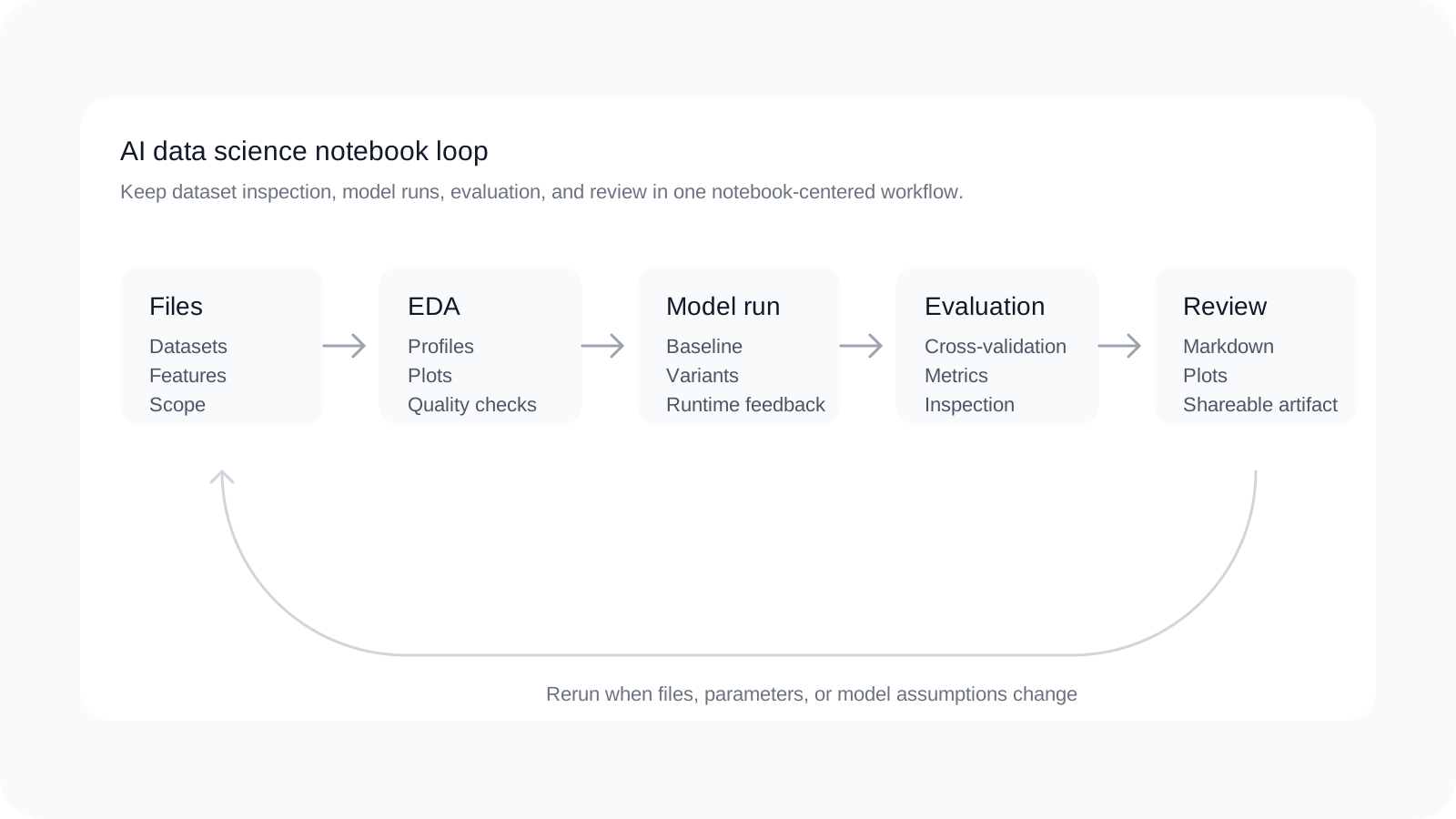
A practical team workflow can stay simple as long as the notebook remains the center of gravity.
- Load files into a workspace with explicit scope. Keep the project boundary clear so collaborators know what data the notebook depends on.
- Inspect distributions and quality in notebook cells. Let AI help summarize the data, but keep the actual inspection code and outputs visible.
- Establish a baseline model and visible metrics. The first result should already be reproducible and easy to rerun.
- Compare variants through runnable notebook code. Use the notebook to show what changed and how the scores moved.
- Inspect failure cases and model behavior, not only topline scores. Keep diagnostic plots and reasoning in the same artifact.
- Summarize conclusions in notebook markdown. The handoff should explain not only the numbers but also the logic behind them.
- Share the notebook artifact for review. Teammates should be able to inspect the work without reconstructing the entire assistant conversation.
This is also where AI-native notebooks can be meaningfully different from using a chat tool beside Jupyter. The more the assistant can work through files, cells, execution, and revision inside the notebook, the less fragile the workflow becomes.
Where Avenlo fits
Avenlo is built for this notebook-native model. Files remain scoped to the workspace, AI help operates in the notebook workflow itself, runtime execution is part of the loop, and the result is still a reviewable notebook artifact. That makes it a fit for teams who want faster data science iteration without moving the important work out of the notebook.
If you are evaluating the broader category first, start with AI Jupyter notebook or read AI Jupyter notebook workflows. If you want to try the workflow directly, create an account and start with a small real dataset inside a single workspace.
FAQ
What is an AI data science notebook?
It is a notebook workflow where AI helps inspect datasets, write runnable analysis cells, compare models, and explain results while the notebook stays the main artifact for review and reproducibility.
Is this different from using Jupyter with ChatGPT beside it?
Yes. A sidecar chat can help ideate, but a notebook-native workflow keeps code, outputs, plots, and written conclusions in the notebook itself so teammates can inspect what actually ran.
Why is cross-validation or repeatable evaluation relevant here?
Scikit-learn’s model selection guidance emphasizes disciplined evaluation because training and testing on the same data produces misleading results. A useful AI notebook workflow should make repeated evaluation easier, not hide it.
Can an AI notebook help with exploratory analysis and model comparison?
Yes, if it can inspect files, draft runnable EDA cells, generate model-comparison code, revise after runtime errors, and leave visible plots, tables, and markdown behind in the notebook.
What makes a notebook-based ML workflow reviewable?
A workflow stays reviewable when the notebook reflects the real analysis: data assumptions are visible, outputs match the current code, evaluation steps are reproducible, and collaborators do not need the full chat history to understand the work.
References
- JupyterLab documentation — Computational notebook definition and JupyterLab positioning.
- JupyterLab notebooks documentation — Notebook document model, runnable code, and rich output behavior.
- scikit-learn model selection and evaluation — High-level model selection and evaluation guidance.
- scikit-learn cross-validation guide — Why evaluation discipline matters and how repeated validation works.
- scikit-learn inspection guide — Why metrics alone are often insufficient and model inspection matters.
Related pages
Continue exploring
Category
AI Jupyter notebook
The broader framing for teams researching notebook-native AI workflows.
Guide
AI notebook workflows
A practical guide to reproducible analysis with agents inside notebook environments.
Documentation
Getting started
Understand the workspace, runtime, and product model behind the notebook workflow.