Agent workflow
Jupyter AI agent for notebook execution, file-aware analysis, and reproducible workflows
See what a notebook-native AI agent should actually do inside technical workflows, from inspecting files and drafting runnable cells to reacting to execution feedback and improving the notebook artifact itself.
Quick answer
A Jupyter AI agent is useful when it can operate inside the notebook workflow rather than only talk about it. The value is not that AI can answer notebook questions. The value is that AI can use notebook context, files, and tools to move work forward inside the artifact your team will actually review.
That means the real use case is file-aware analysis, executable cell creation, runtime feedback, and notebook reviewability. If the agent cannot meaningfully interact with the notebook’s working context, then it behaves more like a sidecar assistant than a notebook-native agent.
For technical teams, the important question is not whether the assistant sounds smart. It is whether the workflow ends with a better notebook: clearer cells, visible outputs, and an analysis trail that someone else can inspect and rerun.
What a notebook-native agent actually needs to do
Project Jupyter and JupyterLab describe notebooks as shareable documents that combine code, narrative text, data, rich visualizations, and interactive outputs. That definition matters because it tells you what the agent is working inside. A notebook is not only a prompt target. It is a structured analytical artifact.
So an agent in this environment needs to do more than generate text. It should work with notebook state, workspace files, and execution results. It should help write code cells, preserve markdown explanations, and react to what actually happened when the code ran.
That is the minimum bar before "agent" language becomes meaningful in notebook products. If the assistant cannot operate on the notebook’s real working context, it is not materially changing the workflow.
What makes an agent different from sidecar chat
OpenAI’s function calling and tools documentation frames the underlying distinction clearly: tools let models interact with external systems and data instead of relying only on the base model response. That is what makes agent behavior materially different from a passive assistant. In notebook workflows, those tools need to connect to files, cells, and execution rather than generic web actions alone.
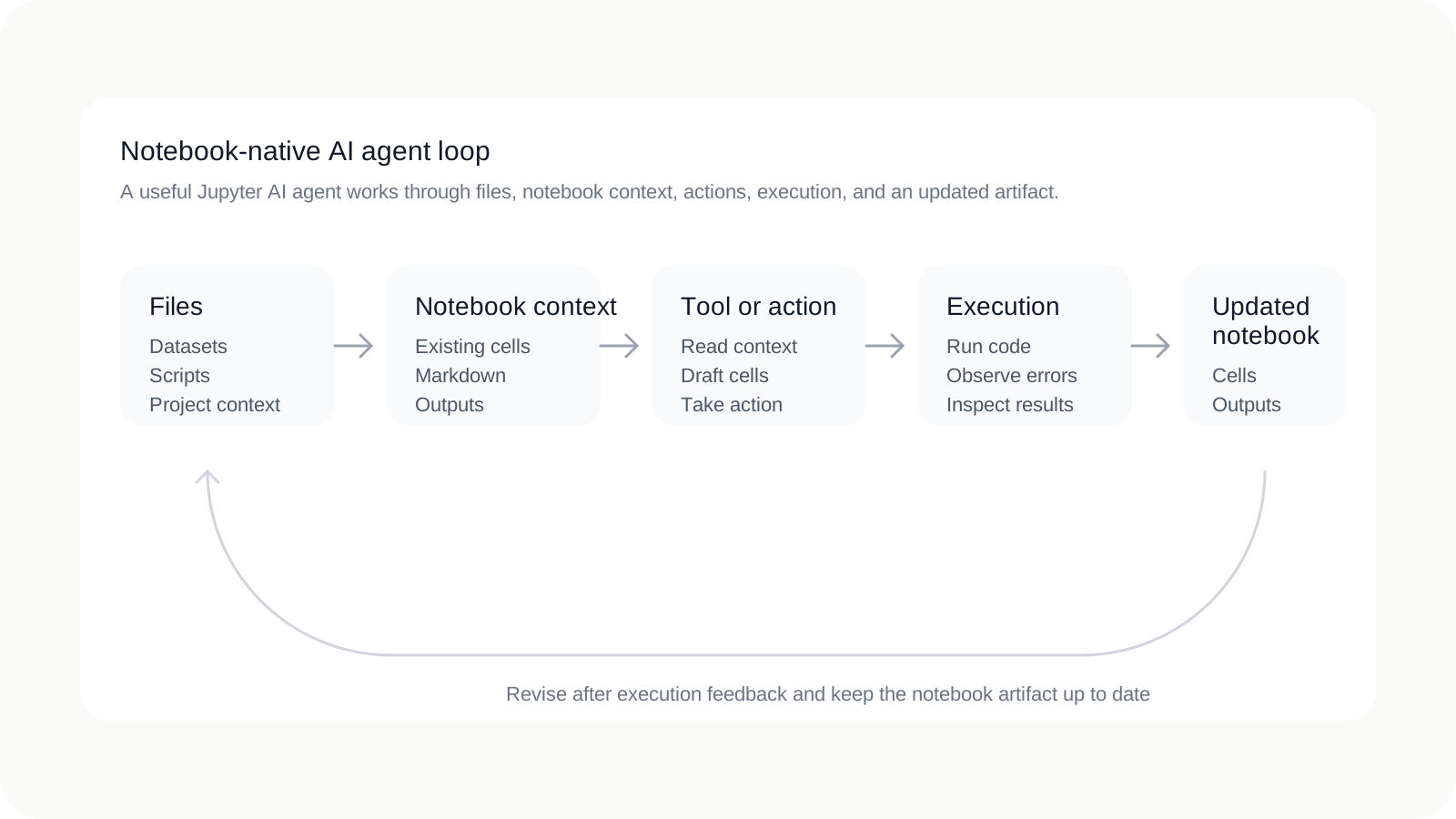
In this page, notebook-native agent is synthesis rather than an official Jupyter taxonomy. The term means an agent designed to participate directly in the notebook workflow by inspecting working context, taking actions, observing results, and updating the notebook artifact.
| Sidecar assistant | Notebook-native agent |
|---|---|
| Talks about what you might do next in a notebook. | Works with notebook context, files, and actions to move the notebook forward. |
| Suggests code in chat that you paste manually. | Produces runnable cell content intended for execution inside the notebook. |
| Cannot meaningfully react to execution unless the user re-explains it. | Uses execution feedback and errors as part of the revision loop. |
| Prompt history becomes the real place where work happened. | The notebook artifact remains the main place where the work is visible. |
That is the practical difference users are usually searching for when they type terms like "Jupyter AI agent." They want something that can act within notebook work, not merely comment on it from the side.
Where notebook workflows usually break without agent-native tooling
This section is workflow analysis rather than a standards claim, but the failure modes are common. Code suggestions live outside the notebook. The assistant cannot act on files or current runtime state. Errors have to be copied back into chat manually. The notebook stops reflecting the real working context. And eventually collaborators need the full prompt history to understand what actually happened.
- Code suggestions live outside the notebook: useful snippets get pasted in without preserving the surrounding reasoning.
- The assistant cannot act on files or runtime state: it only knows what the user retypes into the prompt.
- Errors require manual handoff back into chat: revision becomes slower exactly when the workflow should get tighter.
- The notebook stops reflecting the real context: files, outputs, and assumptions drift apart.
- Review depends on prompt history: teammates cannot audit the notebook alone.
A notebook-native agent should reduce those handoff gaps by making the notebook a better and more complete record of the work, even as the workflow becomes faster.
What the source ecosystem already teaches
Project Jupyter’s description of the notebook format gives the first lesson: notebooks matter because they preserve code, narrative, equations, and rich output together as a record of a user session. JupyterLab’s notebook documentation reinforces that the artifact is not only text. It is live runnable code plus the results and explanations surrounding it.
OpenAI’s function calling documentation gives the second lesson: useful agents need access to tools, external data, and actions beyond a plain text response. That is why tool calling exists as a distinct workflow. It lets the model do more than answer from memory; it lets the model interact with the surrounding system.
Taken together, those two ideas explain what a strong notebook agent should be. It is not merely a chat interface attached to Jupyter. It is an agent that combines structured notebook artifacts with tool-driven interaction so analysis can stay executable, inspectable, and updated in place.
Workflow lesson
Notebooks preserve the analytical artifact. Tools let agents access data and actions. A useful notebook agent combines both in one visible loop.
What good Jupyter AI agent support looks like
Once you frame the problem this way, the evaluation criteria become concrete. A useful notebook agent should improve the notebook workflow itself rather than simply adding more chat around it.
- Inspect workspace files and notebook context: the agent should understand what already exists before proposing more work.
- Write executable notebook cells: it should produce runnable code and markdown, not only prose suggestions.
- Run code and react to runtime errors: execution feedback should be part of the loop, not a separate manual step.
- Preserve outputs and explanations: tables, plots, and markdown should remain in the notebook artifact.
- Make intermediate steps inspectable: collaborators should be able to follow what changed and why.
- Leave behind a cleaner notebook artifact: the notebook should be more reviewable after the interaction than before it.
Those are the real criteria for evaluating the category. If a product cannot support them, it is better described as an assistant near notebooks than an agent working through them.
A practical notebook-agent workflow for teams
A practical workflow stays simple when the notebook remains the center of gravity and the agent participates directly in the same loop.
- Start with a workspace and explicit file scope. Keep the project boundary clear so the agent and the team operate on the same context.
- Let the agent inspect relevant files and existing notebook state. It should understand what is already there before proposing changes.
- Have the agent draft runnable cells. The notebook should capture the analytical steps as executable work, not only as chat output.
- Execute and review outputs in the notebook. Tables, plots, and errors should be visible where the work is happening.
- Revise after runtime feedback. The agent should help tighten the loop when code does not behave as expected.
- Keep summaries and conclusions in notebook markdown. The analysis should become easier to read as the work progresses.
- Share the notebook artifact for review. Teammates should be able to inspect the notebook without reconstructing the entire assistant exchange.
This is why notebook-native agent design matters. The more often the workflow has to jump between notebook, terminal, and chat just to stay coherent, the less value the agent is actually adding.
Where Avenlo fits
Avenlo is built around that notebook-native model. Files remain scoped to the workspace, AI assistance operates inside the notebook workflow, runtime execution is part of the loop, and the result stays a reviewable notebook artifact. That makes it a fit for teams who want an agent to participate directly in notebook work rather than sit beside it.
If you want the broader category framing first, start with AI Jupyter notebook, read Jupyter vs Colab vs AI-native notebooks, or see AI Jupyter notebook workflows. If you want to try the workflow directly, create an account and start from one workspace with a small real project.
FAQ
What is a Jupyter AI agent?
It is an AI agent that can work inside notebook workflows by inspecting files, drafting runnable cells, reacting to execution results, and helping update the notebook artifact rather than only answering questions beside it.
How is this different from using ChatGPT beside Jupyter?
A sidecar assistant can suggest ideas, but a notebook-native agent is useful when it can work with notebook state, files, and execution feedback so the notebook itself becomes the durable record of the work.
Does an AI agent need tools to be useful in notebooks?
In practice, yes. OpenAI’s function calling and tools guidance exists because useful agents need ways to access external data and take actions. Notebook work is more valuable when those actions connect to files, cells, and execution results.
Can a notebook agent work with files and runtime feedback?
That is the point of a strong notebook-agent workflow. The agent should be able to inspect relevant files, generate runnable notebook work, observe what happened during execution, and revise the notebook accordingly.
What makes a notebook-agent workflow reviewable?
It stays reviewable when the notebook reflects the real process: code and markdown are updated in place, outputs match the current cells, important file assumptions remain visible, and collaborators do not need the full prompt history to follow the work.
References
- Project Jupyter home — Notebook document format, session record, kernels, and open protocol framing.
- JupyterLab documentation — Computational notebook definition and JupyterLab positioning.
- JupyterLab notebooks documentation — Notebook document model, live runnable code, and rich outputs.
- OpenAI function calling guide — How models use tools and external actions beyond plain responses.
- OpenAI agents guide — Official framing for agent workflows and the broader agents platform.
Related pages
Continue exploring
Category
AI Jupyter notebook
The broader framing for teams evaluating notebook-native AI workflows.
Comparison
Jupyter vs Colab vs AI-native notebooks
Compare local, hosted, and agent-driven notebook categories before choosing a workflow.
Guide
AI notebook workflows
A practical guide to reproducible analysis with agents inside notebook environments.