Guide
AI Jupyter notebook workflows: how to keep analysis reproducible
Learn how to build AI Jupyter notebook workflows that stay reproducible, inspectable, and team-friendly across data loading, experimentation, runtime execution, and review.
Quick answer
A good AI notebook workflow keeps the notebook as the artifact and uses AI to accelerate work inside that artifact. The point is not to replace notebooks with chat. The point is to shorten the path from question to runnable analysis while leaving behind code, outputs, plots, and written reasoning that other people can inspect.
That means teams should optimize for reproducibility, visible execution, and reviewable outputs, not just faster code generation. If the AI helps but the important steps live only in prompts, ad hoc terminal state, or a side conversation, the workflow gets faster for one person and harder for everyone else.
The strongest AI notebook workflows feel like a continuation of what Jupyter already made valuable: a single place where code, narrative, and results stay together. AI should compress that loop, not dissolve it.
What an AI notebook workflow should preserve
JupyterLab describes a computational notebook as a shareable document that combines computer code, plain-language descriptions, data, rich visualizations, and interactive controls. The notebook documentation similarly describes Jupyter notebooks as documents that combine live runnable code with narrative text, equations, images, interactive visualizations, and other rich output.
That definition is the baseline. A serious notebook workflow is not just code that works. It is a record of what was run, what the outputs looked like, what assumptions were made, and how the analysis was explained. When teams add AI to notebooks, that is the workflow they should be trying to preserve.
In practice, AI should help load files, inspect data, draft cells, revise code after runtime feedback, and turn rough analysis into clearer notebook structure. It should not move the important reasoning out of the notebook and into a place collaborators cannot review.
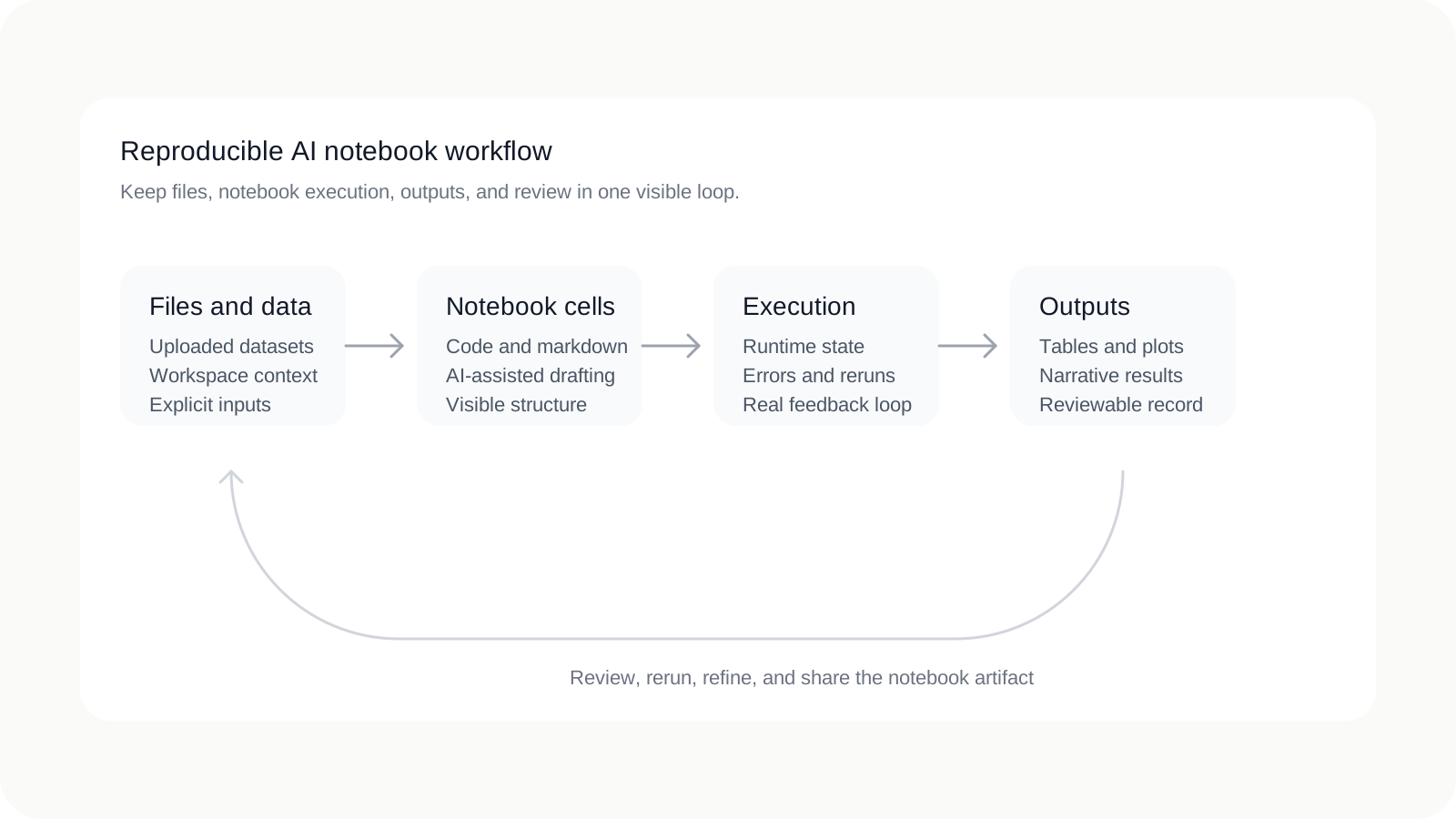
The five parts of a serious notebook workflow
Teams evaluating AI notebook tools should think beyond the assistant itself. The workflow succeeds or fails based on whether five practical pieces stay connected.
| Part | Why it matters | What to preserve |
|---|---|---|
| Notebook artifact | The notebook is the handoff object for analysis, explanation, and review. | Code, markdown, plots, and outputs should remain together in the same document. |
| Runtime and execution state | Notebook work depends on what actually ran, not only what was suggested. | The workflow should expose execution, errors, and reruns instead of hiding them. |
| Files and datasets | Most real analysis depends on local or workspace-scoped inputs. | It should stay obvious which files and data sources informed the notebook. |
| Parameterization and repeated runs | Good notebook work often needs to be rerun with new values, dates, or datasets. | Important parameters should be explicit, not buried in one-off edits or prompts. |
| Sharing and review | Analysis becomes more valuable when other people can inspect and reproduce it. | The artifact should be understandable without replaying the entire chat history. |
Why reproducibility breaks in AI-assisted workflows
The failure mode is not that AI writes bad code. The bigger problem is that AI can make a workflow opaque. This section is workflow analysis rather than a formal standard, but the pattern is common: the faster the assistant feels, the easier it is for the durable artifact to get worse.
Reproducibility usually breaks in a few predictable ways. Code is suggested outside the notebook and then manually pasted in without keeping the surrounding reasoning. Environment drift becomes invisible because the assistant refers to packages, files, or state that are not clearly represented in the notebook itself. Outputs stop matching code because cells are edited without being rerun. File usage becomes ambiguous because the AI looked at data that collaborators cannot locate. And eventually the prompt history becomes more important than the notebook history, which makes review and handoff harder.
| Weak AI workflow | Reproducible AI notebook workflow |
|---|---|
| Important reasoning lives in chat, pasted snippets, and one person's memory. | Important reasoning is reflected in notebook cells, markdown, and outputs. |
| The assistant suggests code, but execution context is hard to inspect. | The assistant works through visible runtime execution and cell updates. |
| Data inputs and environment assumptions are easy to lose. | Files, parameters, and execution assumptions stay easier to trace. |
| Collaborators need the full prompt history to understand the work. | Collaborators can review the notebook artifact itself. |
That is why notebook-native AI matters. The goal is not merely to make the assistant more capable. The goal is to make the workflow more inspectable even as it gets faster.
What the Jupyter ecosystem already teaches
The Jupyter ecosystem already contains the building blocks for thinking clearly about reproducible notebook work. Project Jupyter describes notebooks as an open document format based on JSON that contains a complete record of a user session, including code, narrative text, equations, and rich output. The nbformat documentation adds an important practical point: the notebook format is formally specified, validated by Jupyter tooling, and built around explicit cells, metadata, sources, and outputs.
That matters because reproducibility improves when the artifact has structure. A notebook is not just a blob of text. It is an object with code cells, markdown cells, outputs, execution counts, and metadata that can be inspected, validated, and rerun. AI tooling becomes more useful when it works with that structure instead of bypassing it.
Binder contributes another lesson: reproducibility is not only about the notebook file. The Binder project emphasizes shareable, interactive, reproducible environments and relies on repo2docker to convert repositories into reproducible Docker images. In other words, the environment around the notebook is part of the workflow, not a detail to clean up later.
Papermill contributes a related lesson for repeated analysis. Its documentation treats parameterization as the first workflow step and uses tagged parameters cells so notebooks can be executed with overridden values. That is a useful pattern because many serious notebooks are not written once and forgotten; they are rerun for new data, new dates, or new scenarios.
Workflow lesson
Taken together, Jupyter, nbformat, Binder, and Papermill all point to the same idea: reproducibility comes from a visible artifact, a visible environment, and explicit rerun paths.
What good AI notebook tooling should do
Once you use that workflow lens, the evaluation criteria for AI notebook tools become much clearer. A useful tool should not only answer questions well. It should make the notebook workflow more executable, more inspectable, and easier to repeat.
- Write executable notebook cells: the assistant should produce runnable notebook work, not only free-floating snippets.
- Inspect existing notebook state: it should understand what already exists in the notebook before adding more.
- Use workspace files as context: the assistant should reason over uploaded data and supporting files, not pretend every task starts from zero.
- Run code and adapt to errors: runtime feedback should be part of the loop, so the assistant can revise after real execution.
- Leave markdown explanations and outputs in place: the notebook should become more understandable after AI use, not less.
- Support repeated or parameterized workflows: the tool should work well when analyses need reruns rather than one-off answers.
Those are not just feature ideas. They are the practical criteria that separate notebook-native AI from generic chat glued onto a notebook UI.
A practical AI notebook workflow for teams
A strong team workflow does not need to be complicated. It just needs to make the durable artifact more important than the temporary conversation.
- Start with a workspace and clear file scope. Keep the notebook, datasets, and supporting files together so the context boundary is obvious.
- Inspect data in cells, not only in chat. Let AI help summarize files, but keep the actual inspection steps visible in the notebook.
- Let AI draft code, but execute in the notebook. Suggestions become trustworthy when they are tied to visible runs, errors, and outputs.
- Keep outputs and markdown explanations. When the assistant generates a useful table, plot, or interpretation, preserve it in the artifact.
- Rerun key steps when assumptions change. If files, parameters, or business questions shift, the notebook should show the new run rather than only a rewritten answer.
- Share the notebook artifact for review. Teammates should be able to inspect the notebook without reconstructing the assistant conversation from scratch.
This is also why teams often move beyond using a separate chat window beside Jupyter. The more often code, files, and runtime behavior have to be reconciled manually, the more fragile the workflow becomes.
Where Avenlo fits
Avenlo is designed around this notebook-native model. The product keeps files scoped to the workspace, ties AI assistance to notebook execution, and treats the notebook as the reviewable output rather than an afterthought. That makes it a fit for teams who want AI help inside analysis workflows without giving up inspectability.
If you are evaluating the category more broadly, the useful question is not whether AI can generate code. It is whether the product helps your team end up with a notebook that is easier to rerun, easier to audit, and easier to share. For a broader category comparison, see Jupyter vs Colab vs AI-native notebooks. For the product model itself, see AI Jupyter notebook or Getting started.
If your team wants to try that model directly, create an account and start from a single workspace with a small real dataset.
FAQ
What is an AI Jupyter notebook workflow?
It is a notebook workflow where AI helps inspect data, write cells, execute code, and explain results while the notebook remains the main artifact for review and reproducibility.
How is this different from using ChatGPT beside a notebook?
A sidecar chat can help with ideas, but a notebook-native workflow keeps code, outputs, files, and explanations inside the notebook itself so collaborators can inspect what actually happened.
What makes an AI notebook workflow reproducible?
Reproducibility improves when the notebook artifact is complete, the execution environment is visible, file context is traceable, and important steps can be rerun with explicit parameters or updated inputs.
Do teams need parameterized notebooks?
Not every notebook needs formal parameterization, but repeated analyses often benefit from it. Papermill’s tagged parameters pattern is a good example of how teams can make reruns more explicit.
When does a notebook workflow stop being reviewable?
It becomes hard to review when important reasoning lives only in prompt history, when outputs no longer match the current code, or when collaborators cannot tell which files and environment assumptions shaped the result.
References
- JupyterLab documentation — Definition of computational notebooks and JupyterLab positioning.
- JupyterLab notebooks documentation — Notebook document model, live runnable code, and output behavior.
- Project Jupyter home — Open document format, complete record of sessions, kernels, and open standards.
- nbformat notebook file format docs — Official notebook schema, cells, metadata, sources, and outputs.
- Binder project page — Reproducible environments, repo2docker, and shareable execution.
- Papermill parameterization docs — Tagged parameters cells and repeated notebook execution patterns.
Related resources